Blog - Crusader Beats

The Role of Compression in a Mix and How to Use a Compressor Intentionally

Compression is one of the most powerful—and most misunderstood—tools in music production. Used well, it brings clarity, consistency, and energy to a mix. Used poorly, it can flatten dynamics, kill emotion, and make tracks sound lifeless.

In this article, we’ll explore the role of compression in a mix and explain how to use a compressor consciously, with intention rather than habit.


What Is Compression?

A compressor reduces the dynamic range of a signal—the difference between the loudest and quietest parts.

In simple terms:

  • Loud sounds get quieter

  • Quiet sounds become more audible (after makeup gain)

The goal is not just loudness, but control and balance.


Why Compression Matters in a Mix

Compression helps a mix by:

  • Controlling uneven performances

  • Making tracks sit better together

  • Enhancing punch and sustain

  • Improving clarity and intelligibility

  • Adding character and energy

However, compression should always serve a purpose—not be applied automatically.


Key Compressor Parameters Explained

Understanding the main controls is essential for intentional use.

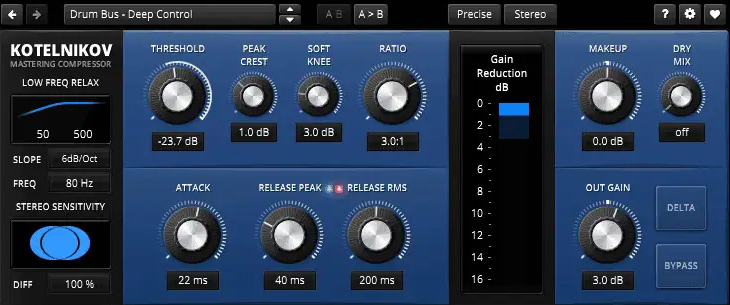
Threshold

Determines the level at which compression starts.

  • Lower threshold = more compression

Ratio

Controls how strongly the signal is compressed.

  • 2:1 – gentle control

  • 4:1 – standard mix compression

  • 8:1+ – aggressive or limiting

Attack

How quickly the compressor reacts.

  • Fast attack → tames transients

  • Slow attack → preserves punch

Release

How quickly compression stops.

  • Fast release → energetic, sometimes aggressive

  • Slow release → smooth and natural

Makeup Gain

Raises the output level after compression.


Compression as Dynamic Control

The most common use of compression is evening out performance dynamics.

Examples:

  • Vocals with inconsistent volume

  • Bass guitar with uneven notes

  • Acoustic instruments with strong transients

Here, the compressor acts like an automatic fader, maintaining a stable level without constant automation.


Compression for Punch and Energy

Compression can also enhance transients and groove.

  • Slow attack + medium release → punchy drums

  • Parallel compression → thicker, more energetic sound

  • Bus compression → cohesive drum or instrument groups

This type of compression is about feel, not just control.


Tone and Color: Creative Compression

Some compressors are valued for their sound character, not just functionality.

  • Optical compressors → smooth and musical

  • FET compressors → aggressive and fast

  • VCA compressors → clean and precise

Using compression for tone means listening carefully and choosing tools intentionally.


Common Compression Mistakes

– Over-compressing everything
– Using presets without listening
– Too fast attack on drums (kills punch)
– Ignoring release timing
– Compressing when automation would work better

Compression should solve a problem—not create one.


When NOT to Use Compression

Not every track needs compression.

Avoid compression when:

  • The performance already sounds balanced

  • Dynamics are musically important

  • You’re compressing “just in case”

Sometimes, the best compressor setting is bypass.


Compression vs. Automation

Compression and volume automation serve different purposes:

  • Compression controls micro-dynamics

  • Automation shapes macro-dynamics

The best mixes often use both, intentionally and subtly.


How to Use a Compressor Consciously (Step-by-Step)

  1. Ask: What problem am I solving?

  2. Start with gentle settings

  3. Adjust attack and release while listening

  4. Match output level (avoid loudness bias)

  5. Bypass often to compare

  6. Stop when it sounds better—not louder


Compression is not about making everything louder or flatter—it’s about control, balance, and musical intention. When you understand what a compressor is doing and why you’re using it, your mixes become clearer, punchier, and more emotional.

Learn to listen. Trust your ears. Use compression with purpose.

How Synthesizers Work – A Beginner’s Introduction

Synthesizers are at the heart of modern music production. From classic analog sounds to cutting-edge electronic textures, synths are used in almost every genre—from pop and EDM to film scores and experimental music. But how do synthesizers actually work?

In this beginner-friendly guide, we’ll break down the core concepts behind synthesizers in a simple and practical way.


What Is a Synthesizer?

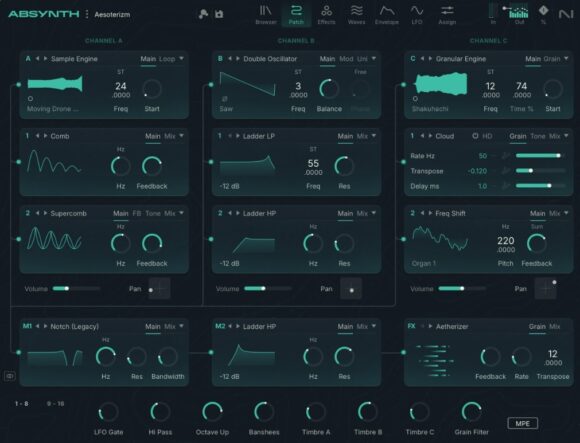
A synthesizer is an instrument that generates and shapes sound electronically. Instead of producing sound through vibrating strings or air columns, synths create sound using oscillators, filters, and modulators.

At their core, synthesizers allow you to:

  • Create sounds from scratch

  • Shape tone and timbre

  • Control sound over time

  • Experiment creatively with audio


The Basic Signal Path

Most synthesizers—hardware or software—follow a similar structure called the signal path:

Oscillator → Filter → Amplifier → Output

Understanding this flow makes learning synthesis much easier.


1. Oscillators – The Sound Source

The oscillator generates the raw sound. It creates a continuous waveform at a specific pitch.

Common Waveforms

  • Sine – smooth and pure

  • Square – hollow and aggressive

  • Sawtooth – bright and rich

  • Triangle – soft but harmonically complex

Each waveform has a unique harmonic structure, which affects how the sound feels and cuts through a mix.


2. Pitch and Frequency

Pitch is controlled by frequency, measured in Hertz (Hz).

  • Low frequencies = bass sounds

  • High frequencies = bright, sharp sounds

When you play different notes on a keyboard or MIDI controller, you’re changing the oscillator’s frequency.


3. Filters – Shaping the Tone

Filters shape the sound by removing certain frequencies.

Common Filter Types

  • Low-pass filter (LPF) – removes high frequencies

  • High-pass filter (HPF) – removes low frequencies

  • Band-pass filter (BPF) – allows a specific frequency range

The most important filter controls:

  • Cutoff – where frequencies start to be reduced

  • Resonance – boosts frequencies around the cutoff point

Filters are key to creating movement and character in synth sounds.


4. Amplifier and Volume Control

The amplifier (amp) controls the loudness of the sound.

Most synths use an envelope to shape volume over time, known as ADSR:

  • Attack – how quickly the sound starts

  • Decay – how fast it drops after the attack

  • Sustain – the level while holding the note

  • Release – how long it fades after releasing the key

ADSR envelopes help create everything from sharp plucks to long evolving pads.


5. Envelopes – Adding Expression

Envelopes aren’t limited to volume. They can also control:

  • Filter cutoff

  • Pitch

  • Modulation depth

This is how synth sounds feel expressive instead of static.


6. LFOs – Movement and Modulation

An LFO (Low-Frequency Oscillator) modulates parameters over time.

Common LFO targets:

  • Pitch (vibrato)

  • Filter cutoff (wobble)

  • Volume (tremolo)

  • Panning

LFOs add rhythm and motion to sounds, making them feel alive.


7. Mono vs. Poly Synths

  • Monophonic synths – play one note at a time (great for bass and leads)

  • Polyphonic synths – play multiple notes at once (pads, chords)

Modern software synths usually support both modes.


8. Analog vs. Digital Synthesizers

Analog Synths

  • Use electrical circuits

  • Warm, unpredictable character

  • Classic sound

Digital Synths

  • Software or digital hardware

  • Extremely flexible

  • Stable and affordable

Many modern synths combine both approaches.


9. Subtractive Synthesis (The Most Common Type)

Most beginner synths use subtractive synthesis:

  1. Generate a harmonically rich waveform

  2. Remove frequencies with filters

  3. Shape dynamics with envelopes

This method is the foundation of countless iconic sounds.


Why Learn Synthesizers?

Understanding synthesis helps you:

  • Create your own unique sounds

  • Modify presets with confidence

  • Work faster and more creatively

  • Improve sound design skills

Once you understand the basics, presets stop feeling like magic—and start feeling like tools.


Synthesizers may seem complex at first, but they all rely on the same core principles. By understanding oscillators, filters, envelopes, and modulation, you unlock a powerful world of sound design.

Start simple. Turn one knob at a time. Experiment freely.
The best way to learn synthesis is by listening and exploring.

Steinberg The Grand 3 – A Classic Concert Piano VSTi

When it comes to realistic piano virtual instruments, Steinberg’s The Grand 3 has long been considered a classic. Designed for composers, producers, and performers who need an authentic grand piano sound inside their DAW, this VSTi focuses on realism, dynamics, and expressive control rather than flashy extras.

In this article, we take a closer look at what The Grand 3 offers, how it sounds, and who it’s best suited for.


What Is Steinberg The Grand 3?

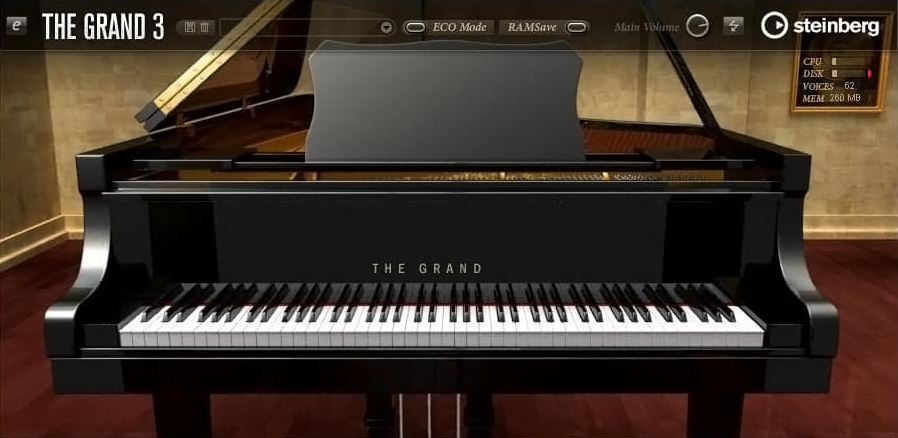
The Grand 3 is a virtual instrument (VSTi) developed by Steinberg, the creators of Cubase and Nuendo. It is a deeply sampled piano library that recreates multiple concert grand pianos with a strong emphasis on natural tone and playability.

Unlike many modern piano plugins that rely on hybrid modeling, The Grand 3 is primarily sample-based, using detailed recordings of real acoustic grand pianos.


Included Piano Models

The plugin includes five distinct piano instruments, each with its own character:

  • Yamaha C7 – bright, clear, and modern

  • Steinway D – warm, rich, and orchestral

  • Bösendorfer 290 – deep, powerful low end

  • Nordiska Upright – intimate and characterful

  • Electric Piano – a classic EP-style sound

This variety makes The Grand 3 suitable for many genres, from classical and jazz to film scoring and pop production.


Sound Quality and Realism

The strength of The Grand 3 lies in its dynamic response and natural decay. Velocity layers are well balanced, allowing soft passages and aggressive playing to feel expressive and musical.

Key sonic features include:

  • Detailed velocity sampling

  • Natural sustain and release behavior

  • Realistic pedal response

  • Smooth transitions across the keyboard

The result is a piano that feels organic and playable, especially when used with a weighted MIDI keyboard.


Interface and Controls

The interface of The Grand 3 is clean and functional, focusing on essential piano-related controls rather than complex sound design.

Main parameters include:

  • Microphone position and stereo width

  • Lid position

  • Pedal noise and key noise

  • EQ and basic tonal shaping

  • Velocity response curves

While the interface may look slightly dated compared to newer plugins, it remains intuitive and efficient.


Performance and System Requirements

Because The Grand 3 uses large sample libraries, it requires:

  • Sufficient disk space

  • A reasonably fast SSD (recommended)

  • Adequate RAM for smooth performance

Once properly set up, performance is stable, especially inside Cubase, where integration is seamless. It also works well in other DAWs that support VSTi plugins.


Best Use Cases

The Grand 3 works best in situations where realism and authenticity matter most:

  • Classical piano compositions

  • Film and game scoring

  • Jazz and solo piano recordings

  • Pop and ballad productions

  • Studio recording and MIDI performances

It is less suitable for experimental sound design or heavily processed piano effects, as its focus is realism.


Pros and Cons

Pros

  • High-quality, realistic piano sounds

  • Multiple grand piano models included

  • Excellent dynamic response

  • Trusted Steinberg quality

  • Strong integration with Cubase

Cons

  • Large library size

  • Interface feels dated

  • Limited sound-design capabilities

  • Not the newest piano engine on the market


How Does It Compare to Modern Piano Plugins?

Compared to newer libraries like Keyscape or Pianoteq, The Grand 3 may lack advanced modeling or ultra-modern UI design. However, it still holds its own thanks to its musical tone and reliability.

Producers who value consistency, realism, and simplicity often continue to use The Grand 3 alongside newer instruments.


Steinberg The Grand 3 remains a solid choice for producers and composers who need a dependable, realistic piano VSTi. While it may not be the most cutting-edge virtual piano available today, its sound quality and expressive playability still make it relevant—especially for users within the Steinberg ecosystem.

If your goal is a natural-sounding concert piano that sits well in mixes and responds beautifully to performance, The Grand 3 is well worth considering.

Sound Theory Basics: What Every Music Producer Should Know

Understanding sound is the foundation of music production. You don’t need to be a physicist or audio engineer, but knowing how sound works will help you make better creative decisions, improve your mixes, and communicate more effectively with other producers.

In this article, we’ll cover the essential sound theory concepts that every music producer—beginner or intermediate—should understand.


1. What Is Sound?

At its core, sound is vibration. When an object vibrates, it creates waves that travel through the air (or another medium) and reach our ears. Our brains interpret these vibrations as sound.

In music production, sound is represented digitally as an audio signal, but it still follows the same physical principles.


2. Frequency – Pitch Explained

Frequency refers to how fast a sound wave vibrates and is measured in Hertz (Hz).

  • Low frequencies = low-pitched sounds (bass, kick drum)

  • High frequencies = high-pitched sounds (hi-hats, cymbals, air)

Human Hearing Range

  • Approx. 20 Hz – 20,000 Hz

  • Most musical content lives between 40 Hz – 15 kHz

Understanding frequency helps you:

  • Use EQ effectively

  • Avoid muddy mixes

  • Know where instruments sit in the spectrum


3. Amplitude – Loudness and Volume

Amplitude describes the strength of a sound wave and is perceived as loudness.

In digital audio, loudness is measured in:

  • dB (decibels)

  • dBFS (decibels relative to full scale)

Key concepts:

  • Louder is not always better

  • Proper gain staging prevents distortion

  • Headroom is essential for clean mixes

Managing amplitude correctly is the foundation of good mixing.


4. Waveforms – The Shape of Sound

A waveform is the visual representation of sound over time.

Common waveform types:

  • Sine wave – smooth, pure tone (no harmonics)

  • Square wave – aggressive, rich in harmonics

  • Sawtooth wave – bright and full (common in synths)

  • Triangle wave – softer but harmonically rich

Knowing waveform shapes helps you:

  • Design better synth sounds

  • Understand timbre and tone

  • Choose the right sound for the right role


5. Harmonics and Timbre

Two sounds can play the same note but still sound different. Why?

The answer is harmonics.

  • Fundamental frequency = the main pitch

  • Harmonics (overtones) = additional frequencies above it

The combination of harmonics creates timbre, which is the character or color of a sound.

Example:

  • A piano and a guitar playing the same note sound different because of their harmonic content.


6. Phase – A Hidden Mixing Problem

Phase describes the timing relationship between sound waves.

When sounds are:

  • In phase → louder, fuller sound

  • Out of phase → weaker sound or cancellation

Phase issues often occur when:

  • Recording with multiple microphones

  • Layering similar sounds

  • Using stereo effects

Understanding phase helps you avoid thin mixes and unexpected loss of low end.


7. Time-Based Properties of Sound

Sound exists over time, not just frequency.

Important time-related concepts:

  • Attack – how quickly a sound reaches full volume

  • Decay – how fast it fades after the attack

  • Sustain – how long it stays loud

  • Release – how long it takes to fade out

These are commonly referred to as ADSR, especially in synthesizers and compressors.


8. Digital Audio Basics

Modern music production is digital, so these terms matter:

  • Sample rate – how often audio is captured per second (e.g. 44.1 kHz)

  • Bit depth – how detailed each sample is (e.g. 24-bit)

  • Clipping – distortion caused by exceeding digital limits

Higher values generally mean better quality—but also higher CPU and storage usage.


9. Why Sound Theory Matters for Producers

Understanding sound theory helps you:

  • EQ with intention, not guesswork

  • Choose sounds that work well together

  • Avoid technical problems early

  • Work faster and more confidently

  • Translate your music better across systems

It turns random knob-turning into purposeful production.


Sound theory doesn’t kill creativity—it supports it. The more you understand how sound behaves, the easier it becomes to shape it into something musical, emotional, and powerful.

You don’t need to learn everything at once. Start with frequency, loudness, and waveforms—and build from there. Every great producer, whether they realize it or not, relies on these fundamentals.

The Best Free DAWs – Comparison and Recommendations

Getting started with music production doesn’t have to cost a fortune. Whether you’re a beginner exploring your first sounds or a seasoned creator experimenting with new workflows, there’s a free Digital Audio Workstation (DAW) for you. In this guide, we’ll compare the best free DAWs available today and help you choose the one that suits your needs.


What Is a DAW?

A Digital Audio Workstation (DAW) is the central software where you compose, record, edit, arrange, and mix your music. It’s the core of your production process, and the right DAW can make learning faster and more fun.

Free DAWs may have limitations compared to premium versions, but they are fully capable of professional-sounding results—especially when combined with third-party plugins and virtual instruments.


Why Use a Free DAW?

Starting with a free DAW lets you:

  • Learn music production without financial risk

  • Understand core tools and techniques

  • Experiment with different workflows

  • Decide what features matter most before upgrading


Top Free DAWs Compared

Here are some of the best free DAWs currently available, along with their strengths and ideal users.


1. Cakewalk by BandLab

Best for: Windows users looking for a full professional DAW
Platform: Windows
Why it’s great:

  • Fully featured, modern DAW

  • Unlimited tracks and plugins

  • Professional-grade mixing tools

  • Supports VST3 plugins

Cakewalk by BandLab is often considered the most powerful free DAW available. Originally a premium product, Cakewalk now offers advanced editing, mixing, automation, and routing—everything you need to create complete songs. It’s ideal if you want a serious, long-term production environment without paying.


2. GarageBand

Best for: Mac and iOS users, beginners
Platform: macOS, iOS
Why it’s great:

  • Very intuitive interface

  • High-quality built-in instruments and loops

  • Great for songwriting and beat making

  • Easy to upgrade to Logic Pro later

GarageBand is Apple’s free DAW and one of the most beginner-friendly options. The workflow is approachable, the library of sounds is excellent, and it’s perfect for music creators who are new to DAWs. If you already have a Mac or iPad, it’s an easy first step into production.


3. Tracktion Waveform Free

Best for: Creative producers who like flexible workflows
Platform: Windows, macOS, Linux
Why it’s great:

  • Unlimited audio/MIDI tracks

  • Modern, uncluttered design

  • Good plugin support

  • Creative modulation tools

Waveform Free from Tracktion offers a creative and flexible environment. It may feel unfamiliar at first, but its modular approach lets you shape sounds in unique ways. It’s a strong choice for electronic music producers and anyone who wants more experimental tools.


4. Audacity

Best for: Simple recording, editing, and podcast production
Platform: Windows, macOS, Linux
Why it’s great:

  • Lightweight and easy to use

  • Great for editing audio clips

  • Many free plugins available

  • Very low system requirements

Audacity is one of the most well-known free audio editors/DAWs. While it’s not designed for deep MIDI production or large multitrack mixes, it excels at recording, cutting, and cleaning up audio. It’s also widely used for podcasts and simple music projects.


5. LMMS (Linux MultiMedia Studio)

Best for: Beat makers and electronic producers
Platform: Windows, macOS, Linux
Why it’s great:

  • Pattern-based workflow similar to FL Studio

  • Built-in instruments and synths

  • Ideal for loops and electronic music

  • Supports VST plugins (with bridge)

LMMS is a great choice if you’re focused on composing beats and electronic tracks. The pattern-based workflow lets you build arrangements quickly, and it comes with a solid collection of synths and samples to get started.


6. Ohm Studio (Free Version)

Best for: Online collaboration
Platform: Windows, macOS
Why it’s great:

  • Real-time online collaboration with others

  • Built-in instruments and effects

  • Simple interface

Ohm Studio stands out for its collaborative features. If you like working with other musicians online, this DAW makes it easy to share projects and work together in real time.


How to Choose the Right Free DAW

Here are some tips to help you decide:

  • Are you a total beginner? → Try GarageBand or Audacity

  • Do you want pro features?Cakewalk by BandLab is the most fully featured

  • Do you make electronic music?LMMS or Waveform Free

  • Do you want to collaborate online?Ohm Studio

  • Are you on Linux?LMMS or Waveform Free

Also consider:

  • Your operating system

  • Your musical goals

  • Whether you plan to expand into paid tools later


Cakewalk by BandLab

  • Platform: Windows
  • Unlimited Tracks: ✔️
  • MIDI Support: ✔️
  • Audio Recording: ✔️
  • Built-In Instruments: ✔️
  • Plugin Support: VST3

Download

GarageBand

  • Platform: macOS, iOS
  • Unlimited Tracks: ✔️
  • MIDI Support: ✔️
  • Audio Recording: ✔️
  • Built-In Instruments: High quality
  • Plugin Support: Limited AU

Download

Tracktion Waveform Free

  • Platform: Windows, macOS, Linux
  • Unlimited Tracks: ✔️
  • MIDI Support: ✔️
  • Audio Recording: ✔️
  • Built-In Instruments: ✔️
  • Plugin Support: VST/AU

Download

Audacity

  • Platform: Windows, macOS, Linux
  • Unlimited Tracks: ✔️
  • MIDI Support: ❌ (limited)
  • Audio Recording: ✔️
  • Built-In Instruments:
  • Plugin Support: Via plugins

Download

LMMS

  • Platform: Windows, macOS, Linux
  • Unlimited Tracks: ✔️
  • MIDI Support: ✔️
  • Audio Recording:
  • Built-In Instruments: ✔️
  • Plugin Support: VST (with bridge)

Download

Ohm Studio (Free)

  • Platform: Windows, macOS
  • Unlimited Tracks: ✔️
  • MIDI Support: ✔️
  • Audio Recording: ✔️
  • Built-In Instruments: ✔️
  • Plugin Support: ✔️

Download

Tips for Getting Started

Once you’ve chosen a DAW:

  1. Learn the basics: Watch beginner tutorials for your specific software

  2. Explore built-in sounds: Try loops and virtual instruments

  3. Experiment with plugins: Add free synths and effects

  4. Finish small projects: Practice by completing short tracks

  5. Ask for feedback: Share your music with online communities


Free DAWs have come a long way. You don’t need to spend money to start producing music—that’s the beauty of modern tools. Whether you want simple recording, beat making, or full song production, there’s a free DAW out there that fits your workflow.

Pick one, start creating, and most importantly—have fun!

How to Start Making Music at Home – A Complete Beginner’s Guide

Making music at home has never been more accessible. With affordable software, compact equipment, and countless online resources, you can start producing your own tracks from your bedroom or living room—no professional studio required. Whether you dream of creating EDM bangers, lo-fi beats, hip-hop instrumentals, rock demos, or cinematic soundscapes, this guide will walk you through the essential steps to begin your music-production journey.


1. Set Up Your Home Studio (Without Breaking the Bank)

You don’t need expensive gear to start. A simple home setup can grow with you as your skills develop.

The Absolute Essentials:

– Laptop or Desktop Computer
Aim for at least 8 GB RAM (16 GB is ideal). Most beginners can start with whatever computer they already have.

– Digital Audio Workstation (DAW)
A DAW is the main program you’ll use to compose, record, and mix music. Popular options:

Free: GarageBand (Mac), Cakewalk (Windows)
Paid: Ableton Live, FL Studio, Logic Pro, Reaper

– Headphones
Studio headphones give you a clearer, more accurate sound. Good beginner models include the Audio-Technica ATH-M40x or Sony MDR-7506.

Optional (but Highly Recommended) Gear:

– Audio interface – improves sound quality and lets you record instruments or vocals.
– MIDI keyboard – makes playing melodies and chords far easier than clicking notes.
– Studio monitors – speakers designed for accurate audio mixing.

Start small. Add equipment only when you feel you need it.


2. Learn the Basics of Your DAW

Regardless of which DAW you choose, they all share similar core features. Focus on mastering:

– Tracks and channels
– MIDI vs. audio
– Loops and samples
– Plugins and instruments
– Automation
– EQ, compression, and effects

Most DAWs offer built-in tutorials, and YouTube is full of beginner-friendly walkthroughs. Spend a few days learning the interface—it pays off later.


3. Start Making Music with Samples and Loops

If music theory feels intimidating, don’t worry. Modern production tools make it easy to start creating right away.

Try:

– Dragging loops into your DAW to build a simple beat
– Experimenting with drum samples
– Adding melodies using virtual instruments
– Layering sounds to create fuller arrangements

This approach helps you understand how songs are structured without overwhelming you.


4. Understand Basic Music Theory (Just the Essentials)

You don’t need years of training, but learning a few fundamentals will dramatically improve your music:

– What chords are and how they work
– How to build scales
– Common chord progressions (like I–V–vi–IV)
– Basic rhythm patterns

Even 30 minutes a day of practice will make your tracks sound more intentional and musical.


5. Explore Free Plugins and Virtual Instruments

Your DAW includes built-in sounds, but third-party plugins can take your music to the next level—many are free.

Great starter options:

– Instruments: Spitfire LABS, Dexed, Surge XT
– Effects: Valhalla Supermassive, Voxengo Span, TDR Nova

Plugins let you experiment with new textures without spending money.


6. Record Your Own Sounds

Once you’re comfortable with digital instruments, try adding your own recordings.

You can record:

– Vocals
– Guitar
– Keyboard
– Even random household sounds for unique textures

A basic USB mic is enough to start. Recording your own audio makes your music feel more personal and original.


7. Learn the Basics of Mixing

Mixing is where your track comes to life. Start with these core principles:

– Volume balance – the most important part of mixing
– EQ – cuts out unwanted frequencies
– Compression – smooths out volume changes
– Reverb & delay – adds depth and space
– Panning – spreads sounds across the stereo field

You don’t need to master everything on day one—focus on achieving a clean and clear sound.


8. Finish Your First Song (Even If It Isn’t Perfect)

Perfectionism is the biggest enemy of beginners. Your goal is to finish something—not to make a masterpiece.

Try this workflow:

* Create a simple beat
* Add a chord progression
* Write a melody or bassline
* Arrange it into a full track (intro, verse, chorus, etc.)
* Apply basic mixing
* Export and listen on different headphones or speakers

The more songs you finish, the faster you’ll improve.


9. Share Your Music and Get Feedback

If you’re comfortable, post your track on:

– SoundCloud
– YouTube
– Reddit (e.g., r/makinghiphop, r/edmproduction)
– Discord communities

Feedback helps you grow—and the music community is full of supportive beginners just like you.


10. Keep Experimenting and Have Fun

Music is an endless learning process. Explore new genres, try unfamiliar plugins, recreate songs you love, and collaborate with friends. Your style will evolve naturally.

The most important thing? Enjoy the process and stay curious.


Final Thoughts

Starting music production at home is easier than ever, and you don’t need expensive gear or formal training to begin. With a computer, a DAW, headphones, and a bit of creativity, you can start crafting your own songs today. Take it step by step, stay consistent, and let your passion guide you.

FL Studio 21.2: A Leap Forward in Music Production

FL Studio, renowned for its user-friendly interface and powerful features, continues to evolve with the latest update: FL Studio 21.2. This version builds on the platform’s legacy, introducing an array of enhancements designed to streamline the music production process, elevate sound design, and boost workflow efficiency. In this article, I will delve into the key features and improvements in FL Studio 21.2, exploring how they can benefit both beginners and seasoned producers alike.


Enhanced User Interface

One of the standout features of FL Studio 21.2 is its refined user interface. The update includes a range of visual tweaks that improve clarity and accessibility. This will particularly benefit users with larger screens, as the layout has been optimized for better navigation. The new theme options also allow for customized aesthetics, enabling producers to create a workspace that inspires creativity.

New Plugins and Sound Packs

FL Studio 21.2 arrives with a fresh selection of plugins and sound packs that expand the sonic possibilities for music creators. Notably, the update introduces an innovative synthesizer that combines classic analog warmth with cutting-edge digital technology. This synth is designed to cater to a wide range of genres, from EDM and hip-hop to cinematic scores.

In addition to new plugins, users will find an expanded library of royalty-free samples and loops that cover diverse musical styles. This extensive collection is perfect for those looking to jumpstart their projects or find inspiration for their next hit.

Improved Workflow Features

Efficiency is key in music production, and FL Studio 21.2 brings several features aimed at optimizing workflow. The new Track Grouping feature allows users to organize tracks into groups, making it easier to manage large projects. This organization tool helps maintain clarity, especially in complex arrangements.

The update also introduces advanced audio editing capabilities. The audio clip editor now includes more precise slicing tools and an enhanced time-stretching algorithm, allowing for seamless manipulation of samples without compromising sound quality. These features provide greater control over the audio editing process, enabling users to experiment freely without concerns about losing fidelity.

Collaboration Made Easy

In today’s global music environment, collaboration is essential. FL Studio 21.2 enhances collaborative capabilities with built-in integration for cloud storage services. This means that music projects can be easily shared with collaborators, allowing for real-time feedback and modifications. Additionally, the new version supports various file formats, ensuring compatibility with other popular digital audio workstations, making it simpler to work with producers using different platforms.

Advanced Automation and Control

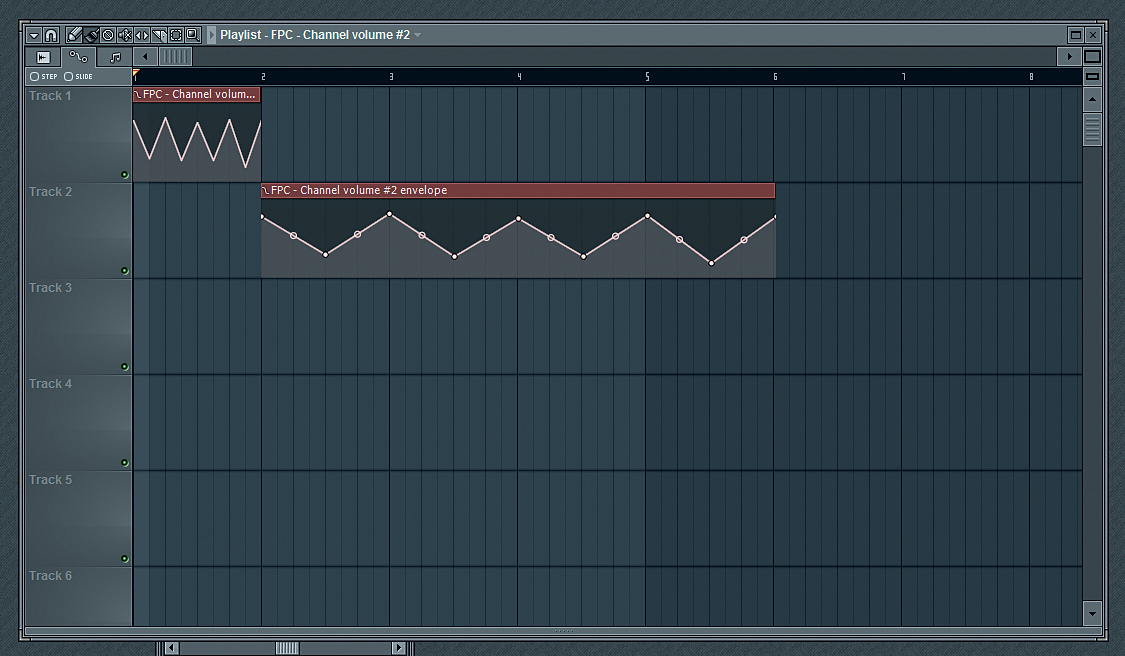
Automation is a cornerstone of dynamic music production, and FL Studio 21.2 takes it to the next level with enhanced automation features. Users can now create more intricate automation curves with improved editing tools, leading to smoother transitions and more expressive arrangements. The update also includes better MIDI controller mapping options, allowing for greater flexibility in live performances and recording sessions.

Conclusion

FL Studio 21.2 is a substantial update that reflects the evolving needs of music producers today. With its enhanced user interface, new plugins, improved workflow features, and stronger collaborative tools, this version reaffirms FL Studio’s position as a leading digital audio workstation.

Whether you’re a novice looking to start your musical journey or an experienced producer seeking innovative tools to enhance your sound, FL Studio 21.2 offers a robust platform equipped to meet your creative demands. As music production technology continues to advance, FL Studio remains at the forefront, inviting users to explore new sonic landscapes and push the boundaries of their creativity.

Those interested in upgrading can visit the official FL Studio website to learn more about the features, pricing, and system requirements of the latest version. With FL Studio 21.2, music production has never been more exciting and accessible.

Official site

Return to homepage

ReFX Nexus 4: Pushing the Boundaries of Virtual Instrumentation

In the ever-evolving landscape of music production, virtual instruments play a crucial role in helping composers and producers realize their creative visions. Among the plethora of options available, ReFX Nexus 4 stands out as a premier software synthesizer, combining ease of use with a vast array of features and an extensive library of high-quality sounds. Launched as the latest iteration of the highly acclaimed Nexus series, Nexus 4 builds on its predecessors by incorporating advanced capabilities while maintaining a user-friendly interface.


Overview

ReFX Nexus 4 is designed to cater to various music genres, from EDM and pop to cinematic scores. Known for its exceptional sound quality and intuitive design, Nexus 4 boasts a range of features that streamline the music production process. It operates as a plugin compatible with multiple digital audio workstations (DAWs) as a VST, AU, and AAX format, making it accessible for a wide range of users, from hobbyist producers to seasoned professionals.

Key Features

1. User Interface: Nexus 4 features a sleek and modern user interface that provides a seamless workflow. The clear layout allows users to navigate through sounds intuitively, making it easy to access and tweak presets quickly. Unlike many synthesizers that can appear daunting, Nexus maintains a visually appealing and straightforward design that encourages exploration.

2. Expanded Library: Nexus 4 comes with a vast library of presets, spanning various genres and styles. The sound library includes everything from lush pads and powerful leads to intricate arpeggios and rhythmic sequences. ReFX has also maintained close ties with top sound designers, offering exclusive expansions that provide even more sonic options, keeping the tool fresh and relevant in an industry that constantly craves innovation.

3. Performance Features: One of the most notable enhancements in Nexus 4 is its performance-oriented features. The new arpeggiator includes a variety of patterns, adjustable rates, and the ability to sync seamlessly with the project tempo. Additionally, users can utilize the improved modulation options for creating dynamic and evolving sounds. This feature allows producers to interact with their music more creatively, generating more engaging compositions.

4. Effects and Processing: Nexus 4 boasts an array of built-in effects that add depth and character to sounds. Users have access to various effects such as reverb, delay, chorus, and distortion, all of which can be intuitively adjusted. This allows for easy sound manipulation without the need for external plugins, making it a versatile solution for both live performance and studio production.

5. Advanced Sound Engine: The sound engine in Nexus 4 is brighter and more dynamic, allowing it to create lush and immersive soundscapes. It utilizes the latest sampling technology to deliver rich textures, resonant timbres, and intricate nuances. Integrating both synth and sampled sounds allows for an extensive range of sonic possibilities, ensuring that users can find the perfect sound for any project.

6. Community and Support: ReFX has cultivated a dedicated community around the Nexus series, with numerous forums, user groups, and fan sites dedicated to sharing tips, tricks, and sound design techniques. This community support, paired with regular software updates from ReFX, ensures that users remain engaged and informed about new developments and sound packs.

Conclusion

ReFX Nexus 4 is more than just a synthesizer; it is an empowering tool for music creators looking to expand their sonic horizons. With innovative features, a diverse library of sounds, and an inviting user interface, it caters to both beginners and advanced users, making music production a more enjoyable and inspiring experience.

Whether you’re crafting a catchy pop anthem, laying down a moody cinematic score, or producing energetic EDM tracks, Nexus 4 provides the versatility and quality needed to bring your musical ideas to life. As the demand for high-quality virtual instruments continues to rise, Nexus 4 positions itself as a leading choice in the realm of digital music production, setting the stage for a new era in sound design.

Buy ReFX Nexus 4

Back to homepage

How to sell beats

Selling beats is a lucrative business for aspiring producers and musicians. With the increasing demand for unique beats and instrumentals, there is a vast market waiting to be explored. However, breaking into this industry can be challenging, so here is a comprehensive guide on how to sell your beats successfully.


1. Perfect Your Craft: Before venturing into selling beats, it is crucial to have a solid foundation in music production. Spend time honing your skills, learning from experienced producers, and experimenting with different sounds and genres. You should strive to create unique, high-quality beats that stand out from the competition. Remember, the first step to selling beats is offering a superior product.

2. Identify Your Target Audience: Understanding your target audience is essential for marketing your beats effectively. Research the different genres and sub-genres of music, and aim to produce beats that resonate with a particular group of artists. Whether it’s rap, hip-hop, pop, or electronic music, tailoring your beats to a specific audience will increase your chances of success.

3. Create an Attractive Website: Having a professional-looking website is essential for promoting and selling your beats. Invest in a visually appealing design that showcases your brand and beats effectively. Ensure that your website is user-friendly, easy to navigate, and allows potential buyers to listen to and purchase your beats seamlessly. With competition fierce in the online world, a solid website is a crucial tool for success.
4. Utilize Social Media Marketing: Social media platforms are powerful tools for promoting your beats. Create accounts on popular platforms like Instagram, Twitter, and Facebook, and establish a consistent brand presence. Post snippets of your beats, engage with your audience, collaborate with artists, and build relationships within the music industry. Additionally, explore relevant hashtags and join forums to connect with potential buyers and artists.
5. Offer Free Beats: One way to gain recognition and create a buzz around your brand is by offering free beats. Many artists and content creators are constantly seeking fresh sounds. By offering free beats for non-profit use, you attract potential buyers who might appreciate your work and eventually purchase exclusive beats from you. This strategy can help expand your reach and establish yourself as a credible producer.

6. Collaborate with Artists: Collaborating with artists is an excellent way to increase your visibility and credibility as a beat producer. Reach out to artists whose style aligns with your beats and propose a collaboration. This can lead to exposure on their platforms, introductions to their networks, and ultimately, more sales. Building relationships with artists is vital for long-term success.

7. Join Online Communities and Submit to Beat Marketplaces: There are numerous online communities and beat marketplaces where you can sell your beats. Websites like BeatStars, Airbit, and SoundClick allow producers to showcase and monetize their beats. Joining these platforms and actively participating in their communities can help you gain exposure and attract potential buyers. Additionally, consider participating in beat contests and challenges to showcase your talent and connect with industry professionals.
8. Provide Multiple Licensing Options: Offer different licensing options to cater to a wide range of customers. Many artists have different requirements when it comes to using beats. Some might be looking for beats for personal projects, while others may need them for commercial use. By providing various licensing options, you can cater to different budgets and usage requirements, ultimately increasing your sales potential.
9. Network with Industry Professionals: Attending music industry events, conferences, and seminars is an excellent way to network and connect with industry professionals. Building relationships with artists, A&R representatives, and music producers can open doors for collaborations, placements, and exposure. Networking is invaluable for growth and can significantly impact your beat-selling career.

10. Stay Consistent and Adapt: Consistency is key when selling beats. Continuously create new beats, experiment with different styles, and adapt to current trends. The music industry is ever-evolving, so staying relevant is crucial. Study market trends, listen to artists, and be willing to adapt your sound to meet the demands of the industry.
In conclusion, selling beats is a competitive industry, and success requires perseverance, skill, and experimentation. By perfecting your craft, identifying your target audience, building a professional website, utilizing social media marketing, collaborating with artists, joining online communities, and networking with industry professionals, you can establish yourself as a successful beat producer. Remember, building a successful beat-selling business takes time, so stay dedicated and motivated as you work towards achieving your goals.

Return to homepage

My YouTube Channel

About Me

I am a music producer, I have been producing music since 2007. I specialize in creating hip-hop, pop and R&B beats. My inspirations are mainly German, Polish and generally European hip-hop. Check out my beats, I’m sure you’ll find something for yourself. Happy listening!
 

Back to Homepage
My YouTube Channel

Flag Counter